Mailchimp Email Marketing & Automation
This practical guide explains how to use Mailchimp for email marketing and automation, covering account setup, audience building, email design, automation flows, and best practices to run effective, high-ROI email campaigns.

Email marketing remains one of the most effective digital marketing strategies, offering high ROI and direct communication with your audience. Mailchimp, a leading email automation platform, simplifies the process of building, managing, and automating email campaigns. Whether you're a beginner in Nepal looking to grow your business or an experienced marketer, this in-depth guide covers everything from account setup to advanced automations.
This tutorial focuses on practical steps for email automation using Mailchimp, including audience building, triggers, template design, and integrations. By the end, you'll have your audience ready for automated email campaigns.
Create a Mailchimp Account
Step-by-Step Signup and Verification
- Go to mailchimp.com and click "Sign Up Free".
- Enter email, username, and password—or use Sign up with Google for instant verification (recommended for speed and security).

(Example of a modern Mailchimp dashboard post-login in 2026)
- Activate via email link (check spam/promotions).
- Complete profile: Business name, address (important for compliance in Nepal), and website.
- Domain authentication: Verify your sending domain early (via DNS records) for better deliverability—now includes enhanced SPF/DKIM setup guides.
Free plan: Up to 500 contacts, basic features. Paid plans unlock Flows, advanced segmentation, and SMS.
Security Best Practices: Enable 2FA immediately. Use strong passwords.
Add an Audience | Tags, Segments, and Configuration
Audiences are your contact databases. Best practice: Use one primary audience organized with tags and segments.
Audience Setup and Organization
- Create via Audience dashboard > Create Audience.
- Use tags (static labels) and segments (dynamic filters) for targeting.
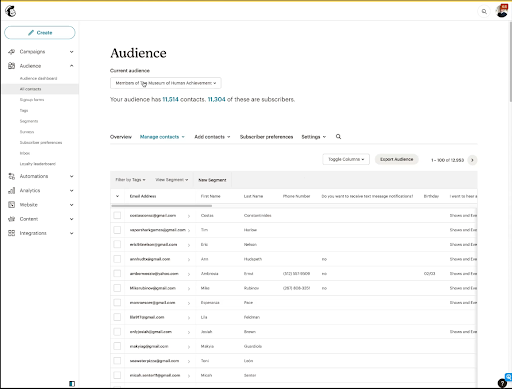
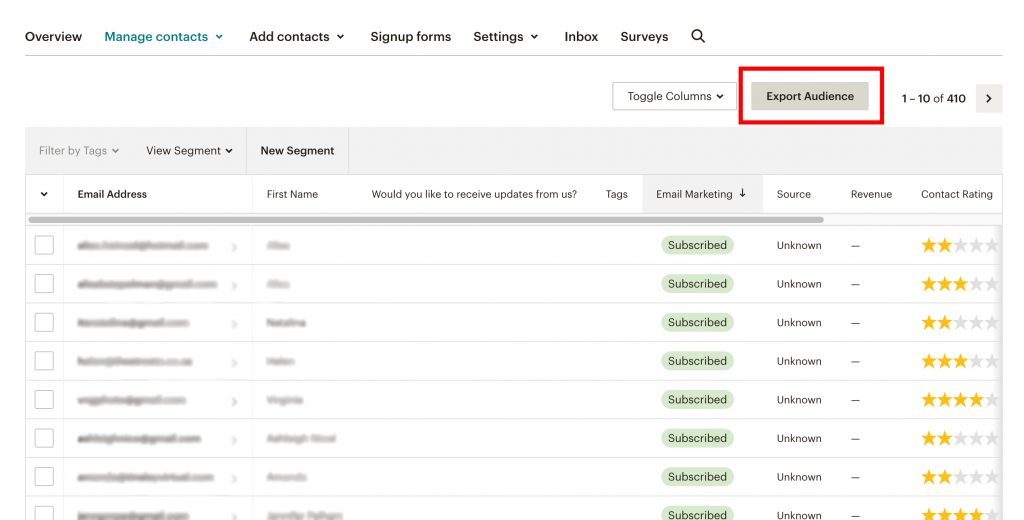
(Examples of CSV import process in Mailchimp)
Methods to Build Your Audience
- Manual CSV Upload (Most Common for Migration)
- Prepare CSV: Columns like EMAIL (required), FNAME, LNAME, PHONE, etc.
- Audience > Add Contacts > Import Contacts > Upload CSV.
- Map fields, add tags during import, choose "subscribed" status.
- Handle duplicates: Update existing or add new.
- 2026 Tip: New beta endpoints allow SMS-only contacts.
- Manually Add Single Contacts
- Add Subscriber > Enter details > Apply tags > Confirm permission (anti-spam compliance).
- Embedded Signup Forms
- Audience > Signup Forms > Form Builder (updated 2026 with popup dominance).
- Customize fields, design, GDPR compliance.
- Embed code for WordPress/sites; auto-tags new signups.
- API Integration for Real-Time Sync
- Generate API key: Account > Extras > API Keys.
- Endpoint: POST /lists/{audience_id}/members
- Example (PHP/cURL):
$data = [
'email_address' => 'example@domain.com',
'status' => 'subscribed',
'merge_fields' => ['FNAME' => 'First', 'LNAME' => 'Last']
];
// JSON encode and POST with auth
- Social Lead Forms Integration
- Native: Meta (Facebook/Instagram) Lead Ads sync.
- Auto-add leads with tags like "FB_Lead".
- Third-Party Integrations
- Zapier: 300+ apps; e.g., Google Forms → Mailchimp.
- Shopify: Sync customers/products/purchases (native or Zapier).
- WordPress: Plugins like Mailchimp for WP.
- 2026 Enhancements: Better Meta/TikTok/Google lead sync.
Audience Ready for Automation: Clean lists regularly—remove inactives for deliverability.
Conditions, Logics, Triggers, and Marketing Automation Flows
As of 2026, use Marketing Automation Flows (formerly Customer Journeys). Classic retired—migrate old ones via built-in tool.
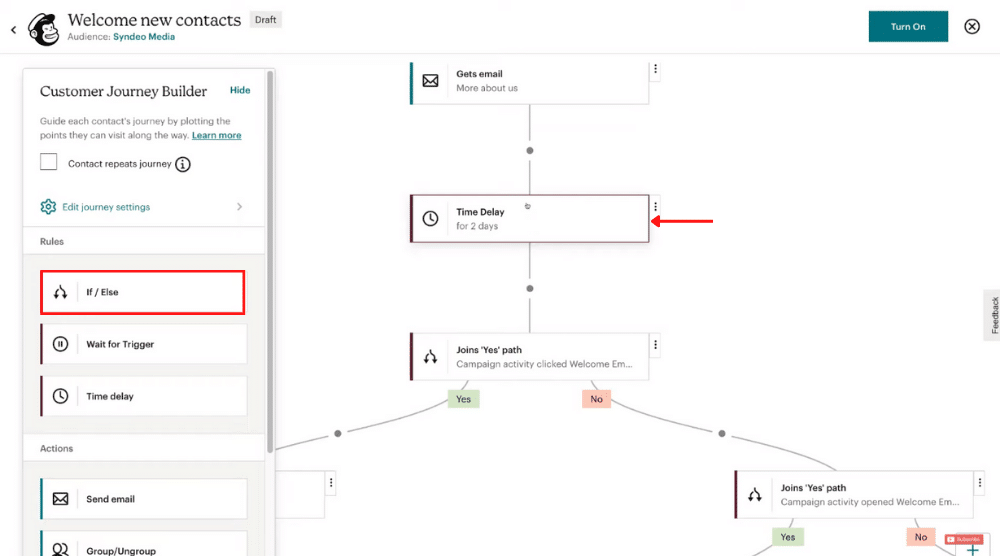

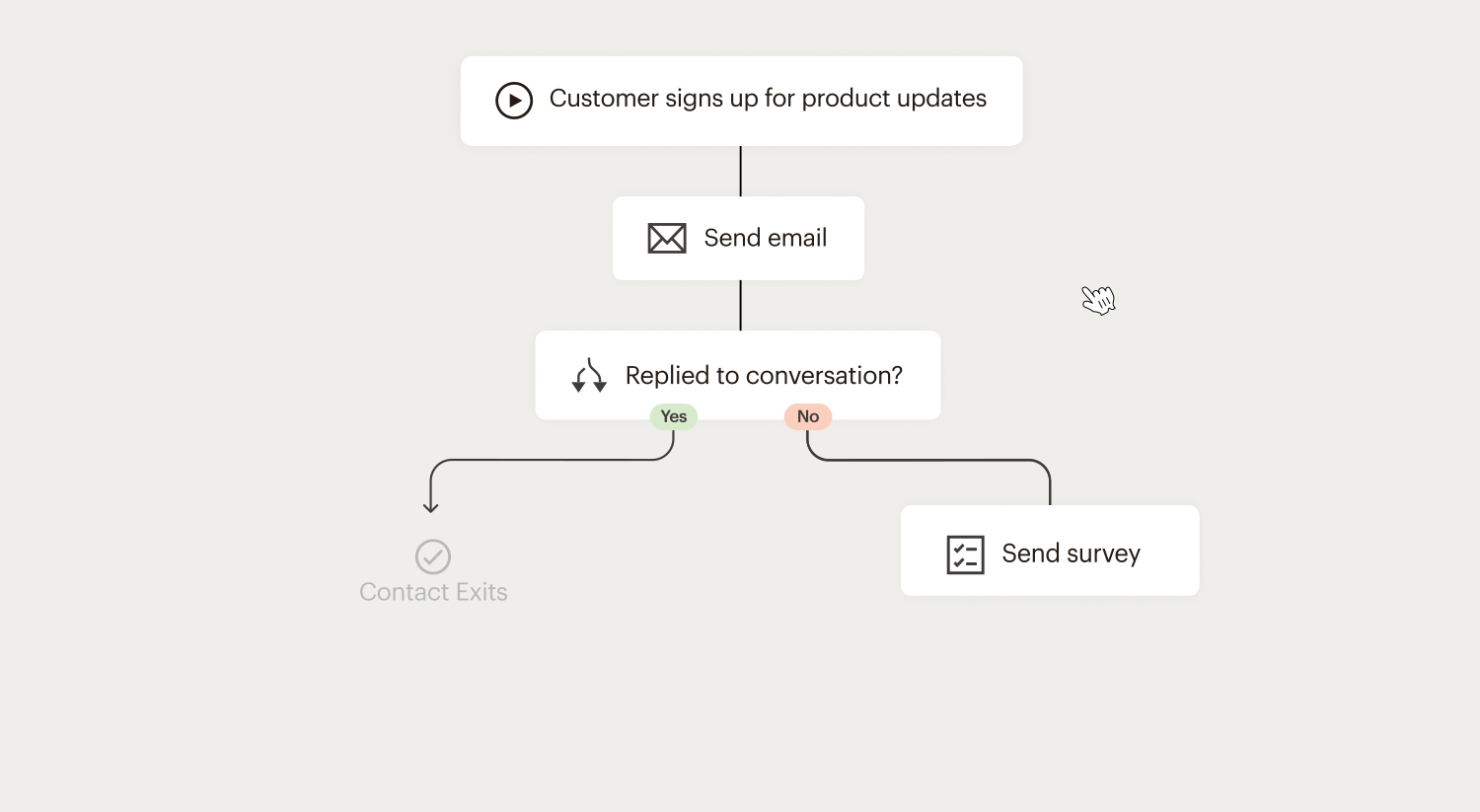
(Visual examples of the Flows builder with branching)
Key Concepts
- Triggers: Starting points (e.g., Signs up, Purchases, Tag added, Date-based, API).
- Conditions/If-Else Logic: Branch paths (e.g., If opened email → Send offer; Else → Reminder).
- Actions: Send email/SMS, add tag, delay, update data.
- Multiple Entry Points: Paid plans allow several triggers.
Building a Flow
- Automations > Create Flow > Choose template or blank.
- Add trigger + settings.
- Drag rules/actions: Delays, splits, emails.
- Personalize with merge tags, dynamic content.
- Test > Activate.
Examples:
- Welcome Series: Trigger on signup → Delay → Email 1 → If opened → Email 2.
- Abandoned Cart: E-commerce trigger → Reminder email.
- Re-engagement: Segment inactives → Win-back series.
Advanced: Behavioral targeting, predictive segmentation (AI guesses purchase likelihood).
Design Email Templates
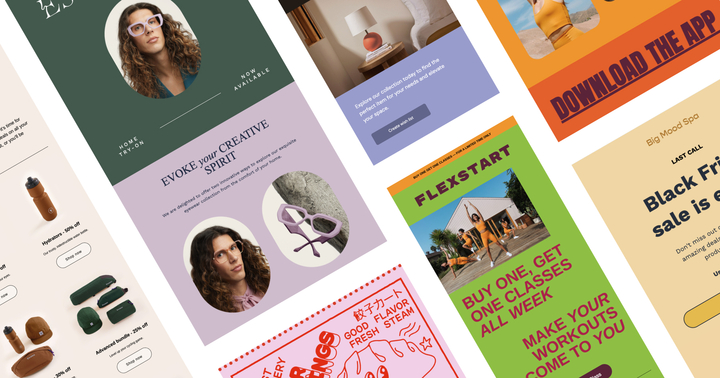

(Examples of responsive template designs)
Types and Builder
- Regular Campaigns: One-off newsletters.
- Automation Emails: Series within Flows.
- New Builder: Drag-drop, 130+ themes, AI content generator (2026 enhanced).
- Custom Code: Import HTML for full control.
- Dynamic Content: Show/hide blocks based on segments.
Best Practices:
- Mobile-first (default responsive).
- Personalize: |FNAME| merge tags.
- A/B Test: Subjects, content, timing.
- Content Optimizer: AI suggestions.
Mailchimp Advanced Topics
Intuit Mailchimp has solidified its position as the #1 AI-powered email marketing platform, with over 2,000 updates since late 2024 emphasizing AI-driven personalization, enhanced automations, and robust analytics. Advanced users leverage these tools to achieve sophisticated segmentation, predictive targeting, omni-channel campaigns, and data-driven optimization—driving up to 30x ROI on e-commerce revenue as reported in recent benchmarks.


AI-Powered Tools and Intuit Assist Mailchimp's generative AI suite, including Intuit Assist (beta for Premium/Standard plans in select countries), transforms content creation and strategy. Key features:
- Generative Content Creation: Instantly generate unique email copy, subject lines, and images tailored to your brand voice.
- Subject Line Helper: AI suggests high-performing headlines to boost open rates.
- Predictive Demographics and Segmentation: AI infers age, gender, and interests from behavior, enabling hyper-targeted campaigns without manual data collection. Premium plans unlock predictive analytics for purchase likelihood and customer lifetime value.
- Send Time Optimization: AI analyzes engagement patterns to recommend (or automate) ideal send times per contact.
- Content Optimizer: Scans drafts for improvements in readability, engagement, and deliverability.
These tools reduce creation time by up to 50% while improving performance—ideal for scaling personalized campaigns.
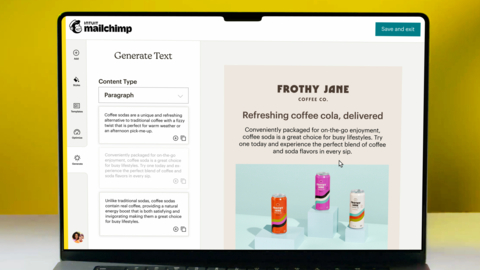

Marketing Automation Flows Rebranded from Customer Journey Builder in June 2026, Marketing Automation Flows is the core advanced automation engine (paid plans only). It supports complex, branching workflows with:
- Multiple triggers (e.g., signups, purchases, tag additions, API events, behavioral like product views in Shopify).
- Conditional logic (if/else splits) based on opens, clicks, data fields, or predictive scores.
- Actions: Send emails/SMS, add tags, delays, update fields, webhooks.
- Dynamic content blocks that personalize per recipient.
- E-commerce specifics: Abandoned cart, browse abandonment, post-purchase upsells.
Flows enable true omni-channel journeys, combining email with retargeting ads or transactional messages.
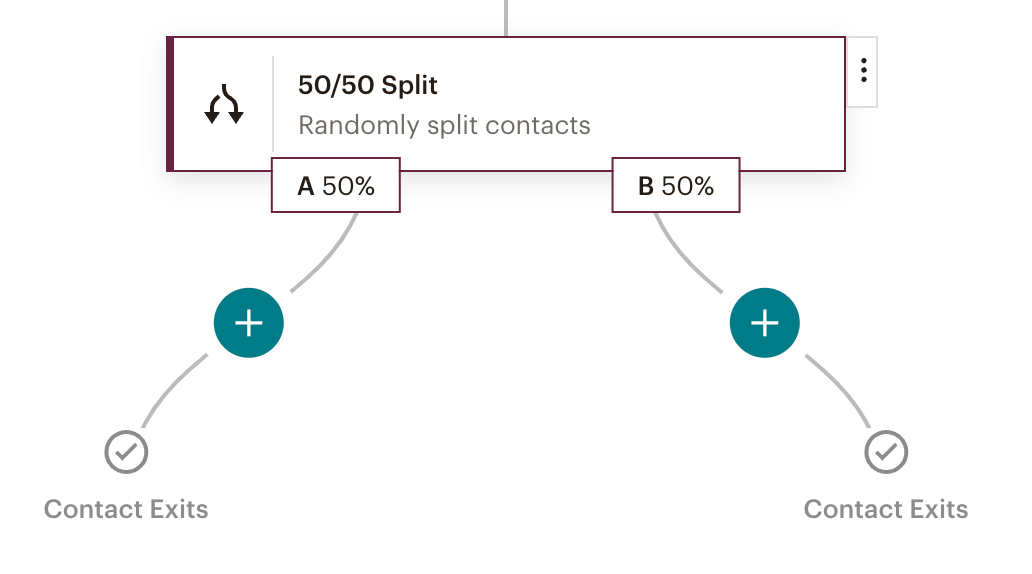
Advanced Segmentation and Behavioral Targeting Go beyond basic lists with:
- Advanced Segment Builder: Nested AND/OR conditions combining demographics, behavior (opens/clicks), purchase history, and predictive data. No limit on conditions.
- Pre-built and Predictive Segments: AI-generated like "Likely to Buy" or "High Engagement."
- Dynamic Content: Show/hide blocks based on segments in a single email.
This powers hyper-personalization, improving relevance and reducing churn.
Analytics, Reporting, and Testing Advanced reporting (Standard+ plans) includes:
- Comparative and custom reports tracking revenue attribution.
- Multivariate/A/B testing (subjects, content, timing).
- Click maps, geo-tracking, and e-commerce ROI dashboards.
- Integration with Google Analytics for full-funnel insights.
Use these to iterate campaigns data-driven.
Integrations and API Over 300 native integrations, plus Zapier for thousands more:
- Deep e-commerce: Shopify (sync products/orders, advanced triggers), WooCommerce, Squarespace.
- CRM: Salesforce sync, QuickBooks for invoice-marketing alignment.
- API v3.0: Robust for custom syncs; new 2026 BETA Audiences endpoints support SMS-only contacts. Webhooks for real-time automation.
Custom coding pros can import HTML templates or use advanced form customization (Standard+).
Deliverability Mastery Post-2026 Gmail/Yahoo changes, focus on:
- Full domain authentication (SPF/DKIM/DMARC).
- Separate subdomains for transactional vs. promotional.
- Engagement-based sending: Clean lists, consistent cadence.
- Tools like sender reputation monitoring and anti-spam checks.
High deliverability (82-85% typical) ensures messages land in primary inboxes.
E-commerce and Omni-Channel Advanced Features
- Product recommendations, promo codes, order notifications.
- Retargeting ads directly from Mailchimp.
- Emerging SMS trends: Interactive messaging, though primarily via integrations.
Custom Coding and Pro Tips
- Advanced form editing: Switch to code mode for hidden fields, redirects.
- Transactional emails via Mandrill (separate but integrated).
Frequently Asked Questions
No FAQs found
Related Posts

Google Performance Max Campaigns Guide by Skill Tech Nepal
Learn how to set up and optimize Google Performance Max campaigns. Discover key benefits, required assets, and best practices to boost conversions.